Bottom line
Chess is a solid Android pick if you want a compact way to play the classic board game with learning tools, visual options, and local two-player mode. The Chess APK keeps the package small, starts from casual play, and gives you enough support features to practice without feeling stripped down.
Its biggest strengths are the mix of 2D, 3D, and automatic views, plus tips, highlights, undo, and performance stats. The trade-off is simple: this is a focused board-game app, not a feature-heavy platform, so you should install it for chess play first and everything else second.
What you get from the app
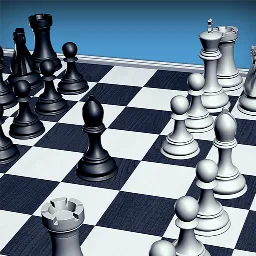
CanaryDroid describes Chess as a 3D chess game for Android built around the standard 8×8 board and the familiar goal of checkmating the opponent’s king. That means you get the classic rules and piece set you already know, wrapped in an app that tries to make play easier to read and manage on a phone.
The feature list is practical. You can choose between 10 play levels, use helpful tips and highlights, undo moves, check detailed performance stats and ratings, and switch among 2D view, 3D view, and Automatic view.
| Core detail | What the listing says |
|---|---|
| Size | 10.4 MB |
| Minimum Android | 6.0 |
| Modes | Single-player levels and 2-player mode |
| Views | 2D, 3D, Automatic |
| Extras | Tips, highlights, undo, stats, save support |
Standout features that matter
The most useful addition is the learning support. Tips, move highlights, and undo all help you recover from mistakes, which makes the app friendlier if you are still building your chess habits or want a low-pressure practice session.
The 10 play levels also give you a simple ladder to climb. You can start on casual settings and move toward Pro, which gives the app a clear training path without forcing you into a more advanced interface than you need.
Visual control is another strong point. If you prefer clarity over polish, 2D view should feel direct; if you want a more dramatic board presentation, 3D view and the six themes for boards, pieces, and backgrounds add variety without changing the basic rules.
Trade-offs: size, permissions, and device support
The app’s small size is one of its cleanest advantages. At 10.4 MB, it should be easy to install on limited storage, and the release notes point to crash bug fixes, which is a good sign that the developer is still maintaining the app.
The minimum Android requirement is 6.0, so it reaches a wide range of devices. The architecture support listed for armeabi-v7a and arm64-v8a also suggests broad compatibility across common Android phones and tablets.
Permissions deserve a quick look. The app requests internet and network-related access, ad-related identifiers and attribution permissions, plus wake lock, foreground service, vibrate, and a dynamic receiver permission. The listing does not spell out why each one is needed, so you should only expect that the app uses network features and ad-related services as part of its setup.
Pros and cons
Pros
- 10 play levels give you an easy path from casual play to tougher matches.
- Helpful tips, highlights, and undo make practice less punishing.
- 2D, 3D, and Automatic views let you choose how you want to play.
- Six themes add some visual variety.
- Automatic save helps if you leave a match or get a phone call.
- Small 10.4 MB size keeps installation light.
Cons
- The app focuses on classic chess, so it does not add much beyond the board-game experience.
- Permissions include network and ad-related access, which may matter to privacy-minded users.
- You need Android 6.0 or later.
- The listing does not mention offline-only play, so you should not assume it.
Who it is for / who should skip it
Who it is for
- You want a simple chess app with built-in practice tools.
- You like switching between 2D and 3D board views.
- You want a local two-player mode for matches with friends.
- You prefer a small app that does not take much storage.
Who should skip it
- You want a chess app with a deeper competitive or tournament feature set.
- You do not want an app with network and ad-related permissions.
- You need something for devices older than Android 6.0.
Verdict
Chess does exactly what a good mobile chess app should do: let you play, learn, and keep matches manageable on a phone. The 10 levels, undo, stats, and view options give it enough depth for regular use, while the small size makes it easy to keep installed.
If you want a straightforward chess app on Android and do not need extra complexity, this is an easy recommendation on APKDown. If you want a more specialized chess platform, the listing here may feel limited, but for classic play it covers the essentials well.
Related downloads
Need the app this guide mentions? Start from its official listing, not a random search result.